By admin on May 10, 2009 | In Windows Vista | No Comments »
 By now it’s obvious that Microsoft’s latest and current operating system, Windows Vista, has been a big failure. The numbers do not lie, most people still prefer Windows XP over Windows Vista (see the numbers in my previous post).
Some people do like Windows Vista, but based on what I read from people’s experiences, I think most would rather go back to Windows XP or they can’t wait for Windows 7 to come out. Those who have never had any issues are the ones who like it. On the other hand, most people did have some kind of problem and they are not happy with the way Windows changed after Windows XP and therefore hate it. Let’s have a look why this is.
10 reasons why Windows Vista is not that great:
- Windows Vista is slow – It takes long time to load.
- It is demanding – Windows XP was too when it came out, but Vista is much more. It needs the latest hardware to run. If you have an older PC you don’t stand a chance.
- It takes up resources – To run Vista smoothly and without delays, your PC needs at least 2GB RAM.
- General usability – Windows Vista has different commands, buttons and it is not always clear what you have to do to arrive at a particular place. It is somewhat confusing and you need more time to get used to it. Control panel options have been changed, and navigating through folders is bit more complicated. Read the rest »
By admin on May 6, 2009 | In Software, Windows 7 | No Comments »
 It’s official. Since Tuesday, 5 May 2009, Windows 7 Release Candidate is available for download for free. At first only MSDN and Technet subscribers were able to download their copy, but now everyone can get the most recent version of Windows 7 and use it for testing. It is the latest test version of the new Windows system and pretty close to the final version which will be released later this year or early next year.
After reading some early reviews of the Windows 7 Beta version earlier this year, I can say it looks like a promising system. Microsoft has introduced many quality and compatibility improvements, designed to replace its inferior predecessor, Windows Vista. Many PC users complained about problems with Windows Vista and it was to expect that this time, Microsoft would produce a much better system. That system is Windows 7.
Windows 7 enjoys early industry support, as over 10 000 companies have signed up for tools and resources needed to prepare their products for Windows 7; for example, Asus already makes motherboards that support Windows 7. The reviews are pretty good so far and expectations are high. I think this could be the best Windows yet!
Read the rest »
By admin on Apr 30, 2009 | In Hardware, PC Crash | No Comments »
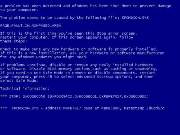 I have recently found out that many PC users have experienced the error with the graphic card driver nv4_disp.dll, and unfortunately, I’m one of them.
This is what happened: my screen worked normally for a while before the Blue Screen of Death appeared, showing some kind of error. I was only able to see the name of the file nv4_disp, which led me to believe it was an Nvidia driver problem. I could only restart the PC and sometimes the problem went away, but it came back later. Before that, sometimes my screen used to black out and I had to force shutdown.
Now, the obvious thing would be to try and boot in Safe Mode and reinstall the driver for the nvidia graphic card. If you want to try this, it would be best to go to the Nvidia Web site and download the latest driver for your video card model and leave it on the desktop. Next, reboot the system in Safe Mode (press and hold F8 after reboot) and go to Control Panel, System and Device Manager. Under Display Adapter, there should be the name and model of your video card. Right click on it and uninstall the device from your system. Reboot the system again, this time normally, and when Windows picks up the new hardware device, simply double click on the installation file you prepared earlier and install the new driver. This solves the problem in most cases.
Read the rest »
By admin on Apr 26, 2009 | In Software, Windows 7 | No Comments »
 According to a leaked page on the Microsoft Partner Program Web site, Windows 7 Release Candidate will be available as early as 5. May this year. Apparently, the page was scheduled to be published in May but it was mistakenly published last weekend. It was quickly taken down after it appeared online.
It looks as though Windows 7 might be nearing its development and testing stages and after a successsful beta release earlier this year and following mostly positive reviews, PC users across the world are eagerly awaiting the more stable successor to Windows Vista.
Even if the rumour is not true, this is the second time that a leaked press release has mentioned the Windows 7 Release Candidate. Microsoft probably want to get out the final Windows 7 version as soon as possible to compensate for bad hype surrounding its current operating system (Windows Vista) and falling sales and profits. Then again, they won’t release and unfinished or untested product. After all, the software needs to meet the quality bar for the release. However, Microsoft has admitted that PC makers such as Dell and HP have already received the Release Candidate to test with their PCs.
Read the rest »
By admin on Apr 15, 2009 | In Hardware, Software | No Comments »
 Are you asking yourself where all the free space on your hard drive has gone when you don’t even have that many (big) files? Do you want to free up space but you don’t know how or what to delete? If yes, then it’s time to investigate and find out what’s taking up the space and figure out a way to free it up for new files.
So, what can you do?
Firstly, you should know that some space is reserved for System Restore, and you can find out how much by going into System Properties (Control Panel, System), selecting your local drive and clicking on Settings. You will see how much space (in GB and percent) has been reserved for this purpose. You can adjust this but don’t turn off this option or you may regret it later. If you need more space, just move the slider to the left a bit.
Sometimes, your space is taken up by hidden files. This can be either a swapfile (pagefile.sys) or hiberfil.sys, a file used in laptops for hibernation. They can take up to 1GB each. Your hard drive can also have a hidden partition with Windows installation files or recovery programs, set up by the manufacturer of your PC.
Read the rest »
