If you are one of the many who are wondering that then you have come to the right place. Every user is raving about how convenient this particular operating system upgrade is. But what is it that really sets it apart from its predecessors? Some of the many benefits that users can enjoy are the following:
1. A Brand New Taskbar
Say goodbye to the Quick Launch toolbar. Windows 7 sports one that allows users to pin applications to their toolbar. This conveniently allows users to launch multiple applications that are grouped together under a single tab. Not only that, the new tabs also let users have a peek at open applications without having to actually open them through a feature called “Aero Peek”. In other words, all they have to do to see what each tab contains is hover over it to receive a small live window to look through.
2. Aero Shake and Aero Snap
The Aero Snap feature allows users to view two separate documents side by side. This is done by opening a window, dragging it to a side of the screen and “snapping” it or making it take up half of the screen. The benefits of doing something like this is obvious since it can come in handy in viewing two documents at the same time. The Aero Shake feature is not only convenient but is also fun to use. Using it lets a user get rid of multiple tabs, except the one that he is interested in by shaking the pertinent tab with the mouse. All the user has to do to review the hidden tabs is to shake the mouse again. If you are used to working with multi monitor systems such a feature can cut the time it takes for you to hide tabs in multiple screens not to mention help you organize your priorities.
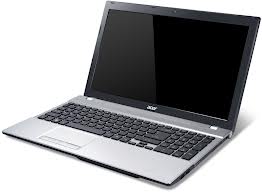
When you decide that it is time for a new laptop computer, you may have no idea where to begin. There are hundreds of options available, and choosing the right one is important. One of the top factors involved in picking out a new laptop is price, and another top factor is the purpose for the computer. The price of the computer is important. You must determine how much you are willing to spend on a new device and begin looking at the options available within this price range. Laptops are available for as little as $400, but they can also cost thousands of dollars.
The purpose of the computer is also important. For example, a student may need a computer that is different from a businessman who uses it for travel purposes. The purpose of the computer will determine what types of specifications you should look for. Students need a computer that is portable because they will carry it around a lot.
Portable computers are generally smaller than other types, but they are usually on the low side when it comes to prices. Students may not need a lot of storage space, but they should look for a laptop that has at least 1 GB of RAM and 160 GB of hard drive space. Business workers often need a laptop that can operate the programs they need to access while they are traveling. They may also need a device that is sturdier and has a faster processor.
Recently I came across a forum post in a prestigious forum site for Mac OS X users. The problem which forum thread stated was:
“The user had improperly ejected his flash drive from the Mac and now the system does not recognize the device after the flash drive is plugged in the USB port. The flash drive holds some valuable data which the user can’t afford to lose. He further asked for some immediate resolution to his problem.”
Reasons why the flash drive is not recognized by the Mac: A simple one-liner statement can explain why a Mac (or any other system) fails to recognize an improperly ejected flash drive. Whenever a flash drive is ejected in this manner the chances of driver files corruption are at the peak. This is the reason why ‘safe removal’ of any external device is recommended by computer experts.
But before finding a solution for unrecognized flash drives, let us consider three crucial cases that are helpful in a circumstance like this:
Solution 1: Launch Disk utility to see whether it still sees the device. Although the flash might not be mounted but the Mac system views it as an unformatted external device. However, if the device is not shown in the disk utility, then go to:
System Profiler<<Menu <<About This Mac<< More Info<<System Report <<USB
A few years back, Telstra BigPond were offering BigPond Security, a solution to the common bugs and Trojans that steal credit card numbers, house alarm combinations and other sensitive data that people leave on their computers. That was the pitch anyway. Before working for Compare Broadband, I was working for BigPond sales. Contrary to most people’s belief that all Telstra centres are based in the Phillipines or India, I was working close to home in Burwood, Victoria. We were paid quite well for call centre work, and there was an attractive, if complicated bonus system.
In a nutshell, your minimum threshold for achieving a bonus was about 120 broadband(BB) sales a month, and 40 value-added services. If you got 150 BBs and no value added, then no bonus. Value added services included NRL or V8Supercars videos on your mobile, BigPond Movies trials and other bits and bobs. But the big push was for BigPond Security, an antivirus program that was either $10 a month or $100 a year. A signup required a credit card number at first; eventually they allowed for it to be added as an additional item to your bill.
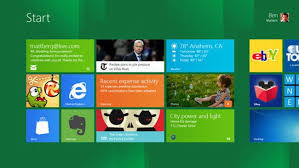
On February 29, 2012, Microsoft released the long-awaited Consumer Preview of Windows 8. With it, the company not only unveiled a new Metro interface and several features to improve the overall Windows experience, but also assured consumers that its newest operating system (OS) would provide enhanced system performance, no matter if they are using high- or low-end machines.
Journalists, developers and early adopters have tested Windows 8 Consumer Preview and have been quite positive about the new OS and its impact on PC performance, but the question remains—is Windows 8 really living up to the hype? There are actually still a few kinks in the OS, which, if included in the retail version, could disappoint PC users.
Great Benefits of Microsoft’s Newest OS
The bulk of initial feedback on Windows 8 Consumer Preview has been encouraging, with some going so far as to hail the new OS as a game changer. The brand new Metro interface sports a sleek design and is optimized for touch-screen devices, providing a clear benefit to those who are on-the-go. However, Microsoft has made it clear that Windows 8 Consumer Preview also works well on traditional PCs.
In that same vein, the new OS encourages the use of apps that we have all come to know and love from our smartphone use. And thanks to cloud connection via Windows Live SkyDrive, users can sign into any device running Windows 8 and be able to instantly access their personal settings and apps.
 If you are one of the many who are wondering that then you have come to the right place. Every user is raving about how convenient this particular operating system upgrade is. But what is it that really sets it apart from its predecessors? Some of the many benefits that users can enjoy are the following: