By admin on May 12, 2012 | In Viruses and Spyware | No Comments »
 A few years back, Telstra BigPond were offering BigPond Security, a solution to the common bugs and Trojans that steal credit card numbers, house alarm combinations and other sensitive data that people leave on their computers. That was the pitch anyway. Before working for Compare Broadband, I was working for BigPond sales. Contrary to most people’s belief that all Telstra centres are based in the Phillipines or India, I was working close to home in Burwood, Victoria. We were paid quite well for call centre work, and there was an attractive, if complicated bonus system.
In a nutshell, your minimum threshold for achieving a bonus was about 120 broadband(BB) sales a month, and 40 value-added services. If you got 150 BBs and no value added, then no bonus. Value added services included NRL or V8Supercars videos on your mobile, BigPond Movies trials and other bits and bobs. But the big push was for BigPond Security, an antivirus program that was either $10 a month or $100 a year. A signup required a credit card number at first; eventually they allowed for it to be added as an additional item to your bill.
Read the rest »
By admin on May 9, 2012 | In Software, Windows 8 | No Comments »
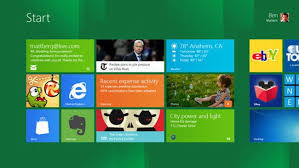 On February 29, 2012, Microsoft released the long-awaited Consumer Preview of Windows 8. With it, the company not only unveiled a new Metro interface and several features to improve the overall Windows experience, but also assured consumers that its newest operating system (OS) would provide enhanced system performance, no matter if they are using high- or low-end machines.
Journalists, developers and early adopters have tested Windows 8 Consumer Preview and have been quite positive about the new OS and its impact on PC performance, but the question remains—is Windows 8 really living up to the hype? There are actually still a few kinks in the OS, which, if included in the retail version, could disappoint PC users.
Great Benefits of Microsoft’s Newest OS
The bulk of initial feedback on Windows 8 Consumer Preview has been encouraging, with some going so far as to hail the new OS as a game changer. The brand new Metro interface sports a sleek design and is optimized for touch-screen devices, providing a clear benefit to those who are on-the-go. However, Microsoft has made it clear that Windows 8 Consumer Preview also works well on traditional PCs.
In that same vein, the new OS encourages the use of apps that we have all come to know and love from our smartphone use. And thanks to cloud connection via Windows Live SkyDrive, users can sign into any device running Windows 8 and be able to instantly access their personal settings and apps.
Read the rest »
By admin on Apr 29, 2012 | In Software, Viruses and Spyware | No Comments »
 With the array of computing devices that are being used by the general masses it is very clear that the threat of cyber crimes and attacks has also increased tenfold. Computing devices are now being used in every aspect of the life. From personal computers to smart phones the threat of losing your data and being more prone to attacks has resulted in creation of the Kaspersky ONE Universal security 2012 by the Kaspersky labs.
This ingenious software is an umbrella protection that covers all the computing devices that you have. It is a moonlit platform solution for threat management and is user centric. It allows the users to protect wide range of computing devices from laptops to tablets and smart phones.
Installation and set up:
Like the antivirus and internet security the installation of the Kaspersky ONE is incredibly cohesive and requires you to have one activation code that you can use on every platform having the software installed in it. Apart from this, the software will not be asking you to constantly upgrade for each device that is under the umbrella but in fact it is a one stop solution. It is on the discretion of the users how many devices they want to bring into the protection and is not restricted by the Kaspersky. For instance the package that covers four devices allows you to choose 3 windows based personal computers, and one Smartphone or whatever combination you want to have.
Read the rest »
By admin on Apr 16, 2012 | In Apple, Internet | No Comments »
 VOIP (Voice/Video Over Internet Protocol) based business phone systems are available for everyone, or so they say. What about all of us using a Mac? Does it mean we cannot benefit from vendor deals? Do business VOIP systems include Apple users? Considering Lion OSX runs like a dream, my iPad feels like my new baby, and my iPhone works with both of them since the beginning, will I have trouble with VOIP telephone systems and my Apple based network and machines? Or am I getting worried over nothing, just because no one is even talking about Apple Mac when it comes to VOIP? Where is the VOIP system for my company if we are using Apple?
Understanding VOIP. VOIP (Voice/Video Over Internet Protocol) technology is only an application that turns analogue sounds into digital sound and sends that data over the internet. This is the essence of VOIP. There is nothing else to it. A business phone system for your office and company is a little more complicated. A VOIP business system uses dedicated servers to supply your office and telephone system with the requirements you have ordered. Your phones are now running through those high-speed servers of your supplier.
Read the rest »
By admin on Apr 11, 2012 | In Apple, PC Crash, Software | No Comments »
 In the computer world, every day sees some altogether new developments or improvements in older ones. New gadgets, applications, plug-ins and sometimes newly configured hardware devices help improve the usability of your old Mac many folds. In contrast to this, sometimes even the new and advanced Mac systems encounter problems, in spite of their robust technology. Therefore, many Mac experts have rightly said that it is not the technology but the timely maintenance that keeps your Mac running well. With advancements in technology, you can find a number of Mac recovery tools in the current software market that can help you solve problems and recover data back.
Your daily work on Mac involves dealing with different applications and related files, which store important data. Sometimes these files get deleted or become inaccessible. The reason behind such instances of data loss or inaccessibility can be accidental or intentional file deletion, formatting of the storage media, virus/malware infection, operating system malfunction, file system corruption or any compatibility issue with newly installed hardware/software.
Read the rest »